Guide · Choosing software
Bridal shop software: what to check before you choose
Most bridal shops choose software once and live with it for years, so the choice deserves an hour of questions before the trial. This checklist is the questions we would ask any vendor, including ourselves. It is organized by what breaks in a shop: brides and fittings, the workroom, money, staff, data, and price.
1. Brides and fittings
- Is the wedding date on everything? Every list, every dress, every fitting should show how many days are left. A system that treats a bride like a retail customer will not.
- Measurements with history. Brides change between fittings. You need each measurement with a date, not one field that gets overwritten.
- Fittings on a calendar with rooms and staff, reminders the day before, and ideally a page where the bride books herself.
- A bride portal. Not a must, but a bride who can see her fittings and her balance calls less. Check whether it is included or an add-on.
2. The workroom
This is where retail tools fail. If your shop makes gowns, alters them seriously, or sends work to outside seamstresses, ask these before anything else.
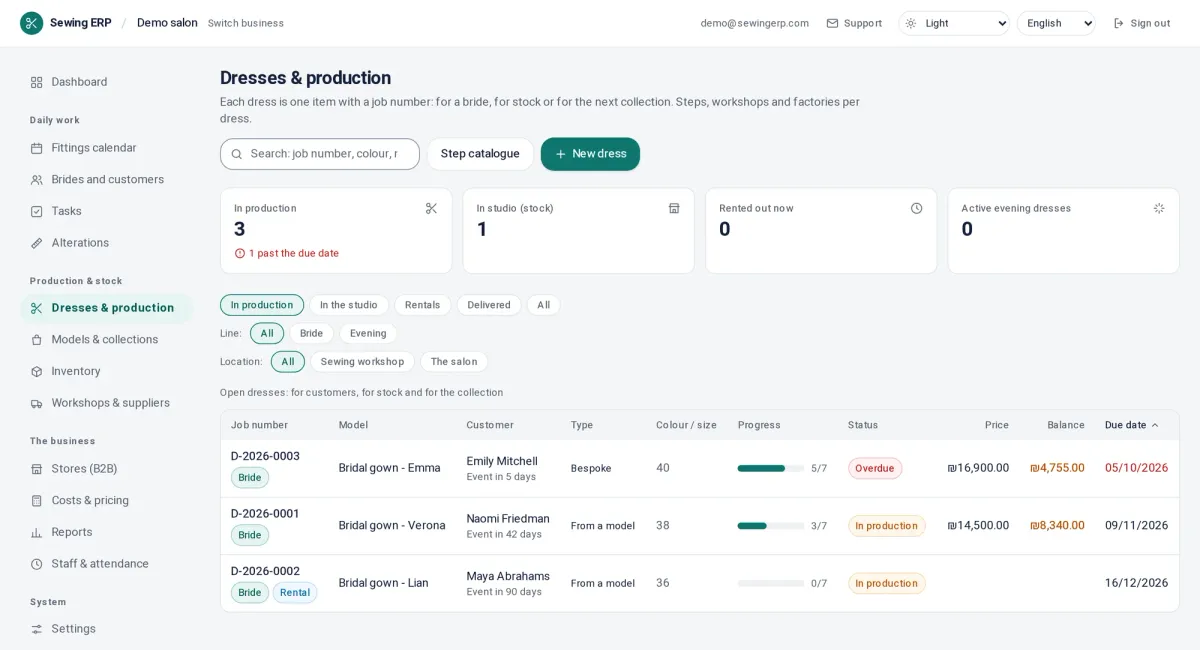
- Does each dress have its own stages? Not a status field with four values: a list of the sewing stages you actually use, with a person and a date on each.
- Can the seamstress report from her phone, without a login she will forget? Scanning a card on the dress is the test.
- Outside seamstresses and workrooms: can you send work out with a return date and a price, and can the supplier confirm without seeing the bride's details?
- Is there a list of what is late today, built from the stages, the fittings and the outside work, or do you build it yourself every morning?
3. Money
- Deposits, payment plans and the balance on the dress, visible on the bride's card and in her portal, with a reminder before the final fitting. A deposit policy that works.
- Do you need the system to take cards? If yes, it must have a point of sale or a processor; if no, it only has to record what you collected.
- The real cost of each dress. Materials, the hours of each stage at each worker's rate, outside work and overhead, against the price. Without it you price the next dress on a guess. How the cost is calculated.
- Invoices and accounting: does it connect to the invoicing tool your accountant uses, or export cleanly?
4. Staff
- Roles. The seamstress should not see prices; the front desk should not edit rates. Ask how roles are set and whether you can change them.
- Attendance. If you pay by the hour, a clock-in from the phone or a tablet at the door saves the monthly argument.
- Languages. A workroom with seamstresses from three countries needs the phone page in their language.
- Per-user pricing. Count everyone who will ever log in, including part-time seamstresses, before you compare prices.
5. Data, privacy and leaving
- Where is the data stored, and who can read it? Ask for the privacy policy and the list of sub-processors; a serious vendor publishes them.
- Can you export everything, any time, in a format another system can import? Try it during the trial.
- What happens when you cancel? How long the data is kept, and whether you can get it back.
- Photos and signed agreements: are they stored with the bride, and are they included in the export?
6. Price and the trial
- Is the price published? If not, the sales call is the price list.
- What is an add-on? Portal, e-signatures, API and rentals are add-ons at some vendors and included at others.
- Yearly versus monthly, setup fees, and what the trial really includes.
- SewingERP's answers: $79, $149 or $249 a month before tax, unlimited users on every plan, portal, online booking and e-signatures included, no setup fee, two months free on yearly billing, and a 14-day trial without a card. Prices are on the pricing page; what each plan includes is listed there too.
How to run the trial
- Import ten real brides with their wedding dates and fittings.
- Open the next three dresses as jobs and let a seamstress report a stage from her phone.
- Record a deposit and a balance, and send the bride a portal link.
- After a week, look at the “late today” list and ask whether it is true.
- Ask the staff which system they opened without being told to.
The comparison pages put the main vendors side by side with their published prices, read on their own sites and dated.
Questions
What should bridal shop software do?
Keep every bride with her wedding date, measurements and fittings; follow every dress through the stages it goes through, in the shop and outside it; record deposits, payments and the balance; show what is late today; and let the staff work from a phone. Retail-only tools stop at the sale; a shop that makes or alters gowns needs the workroom too.
Do I need a point of sale?
Only if you sell off the rack and take cards at the counter all day. A shop that works by order and deposit can record payments it collected elsewhere and does not need a till. Decide this first; it splits the market in two.
How much does bridal shop software cost?
Published prices in 2026 run from about $80 to $250 a month, and some vendors do not publish at all. Watch for per-user limits, appointment caps and add-ons such as a bride portal. SewingERP charges $79, $149 or $249 a month with unlimited users and the portal included.
How long does it take to switch?
With a trial and a CSV import of your brides, a small shop is working in the new system in a week: start with the next bride, not with history. The slow part is the staff habit, so pick the tool your seamstresses will actually open on their phone.